

Archive position — measured, not model output
0 likes on Devpost
2,263 of the 7,850 archived projects have more likes, and 5,587 share exactly 0 — so this project's #3,084 place in the like-ranked listing is a tie-break inside that group, not a ranking.
Projects (log scale)
Likes on Devpost. ▲ marks this project's group.
Show the figures
| Likes | Projects | Share of archive |
|---|---|---|
| 0 | 5,587 | 71.2% |
| 1 | 1,758 | 22.4% |
| 2 | 284 | 3.6% |
| 3–4 | 132 | 1.7% |
| 5–9 | 75 | 1.0% |
| 10+ | 14 | 0.2% |
 User Stories BotA demo video on every pull request
Get a demo video on every new feature
GitHub App that watches your pull requests and records a narrated, captioned demo.
Save time on demo prep and make informed decisions faster with a video walkthrough of every new feature.
Executive Summary
Company: Calendar Clock
Self-reported basis: The description is entirely self-reported and unverified, based on a Devpost submission for the OpenAI 2026 hackathon. No third-party corroboration, revenue, customer data or traction evidence is available.
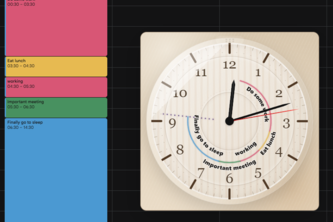
What it appears to be: A Chrome extension that overlays an analog clock onto Google Calendar pages, visualizing calendar events as arcs on the clock face. It is FOSS, local, and private.
What changed: The author describes building a functional Chrome extension using AI tools (Codex, GPT-5.6 Sol) with a feedback loop involving browser automation and live testing. It was submitted to a hackathon.
Single most important open question: Is there any evidence of user adoption or engagement beyond the author’s own use?
Commercial due-diligence read: The project is in an early stage, likely pre-product-market fit. There is no evidence of revenue, customers, or traction. The description suggests a personal tool built with AI assistance, but no commercialization signals are evident.
What The Product Actually Is
The description states that Calendar Clock is a Chrome extension that integrates with Google Calendar. It displays an analog clock directly on the page, with calendar events represented as arcs on the clock face.
- The author describes it as a tool for people who naturally read analog clocks.
- It visualizes “what is happening now and what comes next” in a single glance.
- It is FOSS, local, and private.
- It was built using HTML, CSS, JavaScript, and AI tools like Codex and GPT-5.6 Sol.
Not evidenced: No details on how the extension interacts with Google Calendar's API or DOM, no screenshots, no UI mockups, no technical architecture beyond high-level description.
Positioning & Claim Evolution
The author states that the tool is for people who “naturally read analog clocks” and aims to provide a clear sense of time and events at a glance. It is positioned as a productivity aid for those who prefer analog over digital timekeeping or want a simplified calendar view.
- The extension is described as working “just like that” — implying ease of use.
- It is framed as a personal tool, not a commercial product, and the author uses it himself.
- It is positioned as a free and open-source solution.
Inference: The tool may appeal to users who dislike digital calendar interfaces or want a more visual way to track time. However, this is a self-stated claim, not validated by usage data or user feedback.
Target Customer & ICP
The author states that the extension is for people who “naturally read analog clocks.” It is described as useful for those who want to “stay aware of their time and become more productive.”
- No explicit customer segments are named.
- The tool appears to be aimed at individuals, not enterprises or teams.
- It targets users who may be time-conscious or prefer analog interfaces.
Not evidenced: No data on user demographics, usage patterns, or target personas. No evidence of market research or user interviews.
Business Model & Pricing Evidence
The author states that Calendar Clock is a free and open-source extension.
- It is not described as monetized.
- There are no pricing tiers, subscriptions, or paid features mentioned.
- The author says it is “a free and open-source extension that I now use myself.”
Inference: If the tool were to be commercialized, it would likely remain free or have a freemium model. No evidence of revenue streams or monetization plans.
Technical & Delivery Signals
The author describes building the extension using:
- Codex as the main development environment.
- GPT-5.6 Sol at different reasoning levels.
- A browser harness with Chrome for Testing profile, allowing Codex to interact with live Google Calendar pages.
- Development followed a feedback loop: live testing, debugging, and iteration.
- The extension is built as a Manifest V3 Chrome extension.
- It uses HTML, CSS, JavaScript.
- The author mentions challenges with:
- Context switching
- UI of multiple chats
- Tooling requirements
- Model selection
Not evidenced: No details on performance, scalability, or robustness. No mention of testing frameworks, CI/CD pipelines, or deployment practices.
Traction & Maturity Signals
The author states:
- It is a personal tool they use themselves.
- They are proud of it and hope it helps others become more productive.
- It has a few hundred users, but no further data on adoption or engagement.
Not evidenced: No metrics on user growth, retention, or usage frequency. No evidence of product-market fit or customer feedback loops.
Competitive Context
The author does not mention any competitors or similar tools in the description.
- The extension is described as a novel approach to calendar visualization.
- It is built for Google Calendar and has no stated integrations with other platforms (e.g., Outlook, Apple Calendar).
Not evidenced: No competitive landscape analysis. No evidence of existing tools solving similar problems or market saturation.
Open Questions & Risks
- No commercial traction or revenue: The tool is described as personal and free — no signs of monetization.
- No user data or feedback: No evidence of user engagement, adoption, or product-market fit.
- AI dependency: Heavy reliance on AI tools (Codex, GPT) may not be sustainable or scalable without human oversight.
- Limited scope: The extension is built for Google Calendar only; no roadmap for other platforms.
- Self-reported only: All claims are unverified and based solely on the author’s account.
Questions the description leaves open
- What is your actual user base, and how do you measure engagement?
- Have you received any feedback from users beyond personal use?
- Are there plans to monetize or expand beyond Google Calendar?
- How do you plan to scale beyond a single developer (team size = 1)?
- What are the technical limitations of using AI tools in development, and how do you mitigate them?
Overall Assessment
Not evidenced: No commercial traction, revenue, or customer data is available.
- The project is described as a personal tool, built with AI assistance.
- It is free and open-source, with no signs of monetization.
- There is no evidence of product-market fit, user adoption, or scalability.
- The author is the sole developer, and there is no indication of team expansion or business development.
Assessment: Early-stage, personal project. Not ready for investment or partnership unless further traction or commercialization plans are demonstrated.
User Stories BotA demo video on every pull request
Get a demo video on every new feature
GitHub App that watches your pull requests and records a narrated, captioned demo.
Save time on demo prep and make informed decisions faster with a video walkthrough of every new feature.
Source
Submitted to the OpenAI 2026 hackathon on Devpost. Project home on Devpost. Back to the full gallery on Devpost.
This competitive analysis was produced by top-founders.com (opens in a new tab)
Generated by a language model from this project's public Devpost page — its tagline, the author's own write-up and any built-with tags listed there — as captured in August 2026. Short quotations are the author's words. It is an opinion on the idea as a business, not on the people behind it, and it reflects the description as published then. If the project has moved on, request a correction below. The analysis is not independent research and contains no verified traction, revenue or customer data.
An independent guide by KFG International LLC — not affiliated with, endorsed by, or connected to Devpost or OpenAI.