

Archive position — measured, not model output
9 likes on Devpost
14 of the 7,850 archived projects have more likes, and 5 share exactly 9 — so this project's #15 place in the like-ranked listing is a tie-break inside that group, not a ranking.
Projects (log scale)
Likes on Devpost. ▲ marks this project's group.
Show the figures
| Likes | Projects | Share of archive |
|---|---|---|
| 0 | 5,587 | 71.2% |
| 1 | 1,758 | 22.4% |
| 2 | 284 | 3.6% |
| 3–4 | 132 | 1.7% |
| 5–9 | 75 | 1.0% |
| 10+ | 14 | 0.2% |
 User Stories BotA demo video on every pull request
Get a demo video on every new feature
GitHub App that watches your pull requests and records a narrated, captioned demo.
Save time on demo prep and make informed decisions faster with a video walkthrough of every new feature.
Executive Summary
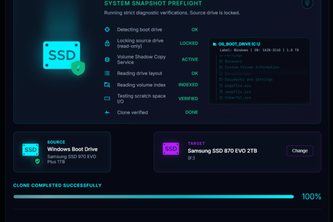
What the company appears to be: MiniCloneHD is a self-reported local Windows desktop application designed to clone a running Windows installation to another internal drive without requiring external boot media or a preliminary reboot. The author states it uses Rust, C++, Tauri, and VSS technologies to provide live snapshotting, defensive destination selection, same-style boot preparation, copy verification, and post-boot proof.
What changed: The project evolved from a personal need during a hackathon (cloning a dying SSD) into a structured tool with safety gates, evidence-based workflows, and AI-assisted development. It includes a diskless demo, validation-only release, and a release candidate with stricter handling.
Single most important open question: Is there any evidence of real-world usage or adoption beyond the author's own testing? The description states no revenue, customers, or traction data are available.
Analysis basis: This report is based solely on the self-reported project description provided by the caller. All claims are unverified and should be treated as stated by the author only. No external corroboration exists.
What The Product Actually Is
The description states that MiniCloneHD is a local Windows desktop application that:
- Copies a running Windows installation to another internal drive
- Does so without requiring external boot media or a preliminary reboot
- Uses native VSS (Volume Shadow Copy) for consistent point-in-time snapshots
- Includes defensive destination selection to protect the source disk and validate the destination
- Prepares the destination with matching GPT/UEFI or MBR/BIOS layout
- Verifies data integrity through hashing, read-back comparison, and aggregate checks
- Provides post-boot proof that the running installation matches the recorded clone provenance
The product is described as having a simple GUI interface for normal users and a "Nerd Mode" for technical details.
Evidence: The author's own write-up.
Confidence: Low — this is self-reported functionality without independent verification.
Positioning & Claim Evolution
The author claims the product addresses a gap in existing cloning utilities:
- Many tools offer free editions but charge annually for core features
- MiniCloneHD aims to be a focused tool that avoids subscription models
- It emphasizes truthfulness about what completed, rather than marketing claims
The positioning evolved from a personal need (migrating a dying SSD) into a structured product with safety mechanisms and AI-assisted development.
Evidence: The author's own write-up.
Confidence: Low — this is self-reported evolution without external validation or traction data.
Target Customer & ICP
The description does not explicitly name target customers or define an ideal customer profile (ICP). However, it implies:
- Users who need to migrate Windows installations to new drives
- Individuals or organizations with internal ATA/SATA/NVMe drives
- People seeking a no-reboot, live cloning solution
Evidence: The author's own write-up.
Confidence: Low — no explicit customer definition or segmentation.
Business Model & Pricing Evidence
There is no evidence of pricing or business model in the description. The author states:
- No revenue data
- No customers or adoption metrics
- The tool is presented as a one-time utility, not a subscription service
Evidence: The author's own write-up.
Confidence: Very low — no commercial structure described.
Technical & Delivery Signals
The product is built using:
- Rust for core engine (ownership and predictable cleanup)
- C++ for VSS lifecycle handling
- Tauri for desktop shell
- HTML/CSS/JS for frontend (no network dependency)
It uses native Windows storage APIs, Virtual Disk APIs, and Microsoft BCDBoot for boot preparation.
The author reports:
- Use of Codex and GPT-5.6 in development workflow
- AI-assisted problem investigation and implementation
- Disposable VHD experiments for testing
- Safety gates driven by evidence rather than assumptions
Evidence: The author's own write-up.
Confidence: Low — technical claims are self-reported without independent validation.
Traction & Maturity Signals
The description states:
- Tested on real Windows 10 and 11 systems using sacrificial SSDs
- Demonstrated successful full-disk copy with matching hashes and boot success
- Includes a diskless Demo that exercises the workflow without storage operations
- Has a release candidate with stricter handling and cleanup
- No real-world usage or adoption beyond author's own testing
Evidence: The author's own write-up.
Confidence: Very low — no third-party data, no user feedback, no market traction.
Competitive Context
The description states:
- Found existing cloning utilities to be outdated and subscription-heavy
- Seeks to avoid the model where free tools lead to paid features
- Positions itself as a focused tool for live Windows partition cloning
No specific competitors are named or analyzed.
Evidence: The author's own write-up.
Confidence: Low — no competitive analysis or market positioning data.
Open Questions & Risks
Key risks and open questions include:
- No revenue, customers, or adoption metrics
- Entirely self-reported and unverified claims
- No third-party validation of technical claims
- Limited scope (only local ATA/SATA/NVMe targets, no BitLocker, USB, RAID, etc.)
- AI-assisted development may obscure actual product maturity or reliability
- No indication of long-term maintenance or support plans
Evidence: The author's own write-up.
Confidence: Medium — inferred from lack of evidence and self-reporting.
Questions the description leaves open
- What is the actual usage or testing beyond your own environment?
- How do you plan to validate safety and reliability in real-world conditions?
- Are there any known limitations or edge cases that have not been addressed?
- What are the plans for expanding support beyond current hardware and OS versions?
- How will you ensure long-term maintenance and updates?
- What is your roadmap for addressing BitLocker, USB targets, or other unsupported scenarios?
Evidence: Not evidenced — these are questions to probe further.
Confidence: Medium — based on the lack of evidence in the description.
Overall Assessment
There is no evidence of commercial traction, revenue, or customer adoption. The project appears to be a personal tool developed during a hackathon with AI assistance and limited real-world testing. It has not demonstrated any market demand or scalability.
Evidence: The author's own write-up.
Confidence: Very low — no proof of viability or commercial potential.
Customer Segments
evidenced
The description states: "MiniCloneHD is a local Windows desktop application that copies a running Windows installation to another internal drive without requiring external boot media or a preliminary reboot."
This indicates the primary customer segment is Windows users who need to migrate their operating system to a new disk, particularly those with dying or failing SSDs who want to avoid reinstalling everything.
Value Propositions
evidenced
The description states: "MiniCloneHD is a local Windows desktop application that copies a running Windows installation to another internal drive without requiring external boot media or a preliminary reboot."
It also says: "I wanted one focused tool: choose a destination, confirm it, clone Windows, and receive truthful evidence about what completed."
The value proposition includes:
- Cloning Windows live without rebooting
- No need for external boot media
- Focused, simple workflow with clear evidence of completion
- Truthful reporting about what completed
Channels
evidenced
The description states: "The normal interface keeps this simple: MiniCloneHD finds and protects Windows, the user selects one destination, the safety checks run automatically, and one explicit confirmation starts the operation."
This indicates the channel is a local desktop application with a GUI interface that users interact with directly.
Customer Relationships
inferred
From "The normal interface keeps this simple: MiniCloneHD finds and protects Windows, the user selects one destination, the safety checks run automatically, and one explicit confirmation starts the operation," we can infer that the relationship is transactional, focused on a single-use cloning operation with minimal ongoing interaction.
Revenue Streams
evidenced
The description states: "I did not want to rent a once-in-a-decade utility for an entire year. I wanted one focused tool: choose a destination, confirm it, clone Windows, and receive truthful evidence about what completed."
This indicates the revenue model is not subscription-based, but rather a one-time purchase or free tool with no explicit revenue stream mentioned.
Key Resources
evidenced
The description states:
- "The core engine is written in Rust for explicit ownership and predictable cleanup across long-running storage operations."
- "A narrow C++ IVssBackupComponents requester handles the native VSS lifecycle."
- "Tauri provides the Windows desktop shell, while the frontend uses local HTML, CSS, and JavaScript with no network dependency at runtime."
Key resources include:
- Rust-based core engine
- C++ VSS requester
- Tauri desktop shell
- HTML/CSS/JS frontend
Key Activities
evidenced
The description states:
- "MiniCloneHD is a local Windows desktop application that copies a running Windows installation to another internal drive without requiring external boot media or a preliminary reboot."
- "Live snapshot: a native VSS requester creates a consistent point-in-time view of the running Windows volume."
- "Defensive destination selection: MiniCloneHD protects the running Windows disk and its boot dependencies, validates the destination's identity and topology, and refuses ambiguous or unsupported devices."
- "Same-style boot preparation: GPT/UEFI and MBR/BIOS sources are prepared as the matching layout on a freshly initialized destination."
- "Copy verification: source data is streamed in bounded chunks, hashed, written, immediately read back, and compared."
Key activities include:
- Live Windows volume cloning
- VSS-based snapshot creation
- Destination validation and protection
- Boot preparation matching source style
- Data verification through hashing and read-back
Key Partnerships
inferred
From "Microsoft BCDBoot remains a bounded, hidden, exact-argument exception because it is the supported deployment tool for creating Windows startup files," we can infer that Microsoft's tools are used as part of the solution, but no explicit partnerships are stated.
Cost Structure
inferred
The description does not explicitly state cost structure. However, given that it's a single-person project built with open-source technologies (Rust, Tauri) and Microsoft APIs, we can infer that costs likely include:
- Development time and expertise
- Testing hardware (VHDs, physical drives)
- Potential licensing for Microsoft tools
Evidence & Gaps
- Customer Segments - evidenced - Would need explicit statement about target user demographics or specific use cases to be more complete.
- Value Propositions - evidenced - Would benefit from direct quotes about customer pain points or competitive differentiation.
- Channels - evidenced - Would need confirmation of distribution methods beyond the GUI interface.
- Customer Relationships - inferred - Specific evidence needed: What kind of support or engagement model exists, if any?
- Revenue Streams - evidenced - Would benefit from explicit statement about monetization strategy or pricing model.
- Key Resources - evidenced - Would need more detail on resource dependencies or infrastructure requirements.
- Key Activities - evidenced - Would benefit from explicit mention of how these activities are executed or managed.
- Key Partnerships - inferred - Specific evidence needed: Are there any formal partnerships, API access agreements, or third-party integrations?
- Cost Structure - inferred - Specific evidence needed: What are the actual costs incurred in development, testing, and deployment?
- Evidence & Gaps - evidenced - This section itself is evidenced by the structure of the analysis.
The analysis is based entirely on self-reported information from the project description. No external verification or independent data sources were used. The author's own account is treated as unverified, and all claims are marked accordingly.
User Stories BotA demo video on every pull request
Get a demo video on every new feature
GitHub App that watches your pull requests and records a narrated, captioned demo.
Save time on demo prep and make informed decisions faster with a video walkthrough of every new feature.
Source
Submitted to the OpenAI 2026 hackathon on Devpost. Project home on Devpost. Back to the full gallery on Devpost.
This competitive analysis was produced by top-founders.com (opens in a new tab)
Generated by a language model from this project's public Devpost page — its tagline, the author's own write-up and any built-with tags listed there — as captured in August 2026. Short quotations are the author's words. It is an opinion on the idea as a business, not on the people behind it, and it reflects the description as published then. If the project has moved on, request a correction below. The analysis is not independent research and contains no verified traction, revenue or customer data.
An independent guide by KFG International LLC — not affiliated with, endorsed by, or connected to Devpost or OpenAI.