

Archive position — measured, not model output
0 likes on Devpost
2,263 of the 7,850 archived projects have more likes, and 5,587 share exactly 0 — so this project's #5,114 place in the like-ranked listing is a tie-break inside that group, not a ranking.
Projects (log scale)
Likes on Devpost. ▲ marks this project's group.
Show the figures
| Likes | Projects | Share of archive |
|---|---|---|
| 0 | 5,587 | 71.2% |
| 1 | 1,758 | 22.4% |
| 2 | 284 | 3.6% |
| 3–4 | 132 | 1.7% |
| 5–9 | 75 | 1.0% |
| 10+ | 14 | 0.2% |
 User Stories BotA demo video on every pull request
Get a demo video on every new feature
GitHub App that watches your pull requests and records a narrated, captioned demo.
Save time on demo prep and make informed decisions faster with a video walkthrough of every new feature.
Executive Summary
What the company appears to be
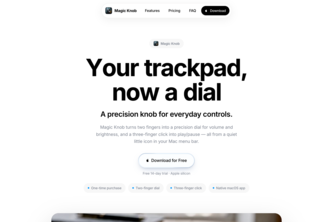
Magic Knob is a self-reported macOS utility app that centralizes media playback controls (play/pause, volume, brightness) into a clean, minimal interface accessible via trackpad gestures. The author describes it as a native app built with Swift and SwiftUI.
What changed
The author states they have been using a custom 2-finger rotation gesture for media control for about two years, which inspired them to build this product. They report launching their first paid app and shipping a polished version after iterative development.
Single most important open question
Is there evidence of user adoption or revenue generation beyond the author’s own use and self-reported launch? The description contains no data on customers, sales, or usage metrics.
What The Product Actually Is
The description states that Magic Knob is a native media control utility for macOS. It is built using Swift and SwiftUI, and designed to centralize common playback actions in one clean interface. The app allows users to control media (play/pause, volume, brightness) with fewer clicks and less friction.
It supports trackpad gestures, specifically a 2-finger rotation gesture that the author found intuitive and natural. It is described as a HUD-based tool that appears during use.
Claim
Magic Knob is a macOS utility app.
Evidence Author’s own write-up.
Claim
It uses Swift and SwiftUI.
Evidence Author’s own write-up.
Claim
It supports trackpad gestures for media control.
Evidence Author’s own write-up.
Positioning & Claim Evolution
The author positions Magic Knob as a tool to reduce friction in media control, enabling users to stay focused while working or watching. It is described as a clean, distraction-free interface for everyday media tasks.
It evolved from the author's personal use of a custom 2-finger gesture that they found intuitive and useful. The app was built with an emphasis on responsiveness, reliability, and low-latency interaction, aiming to make media actions feel immediate and predictable.
Claim
Magic Knob reduces friction in media control.
Evidence Author’s own write-up.
Claim
It is a minimal interface for everyday media tasks.
Evidence Author’s own write-up.
Claim
The app was built with responsiveness, reliability, and low-latency interaction in mind.
Evidence Author’s own write-up.
Target Customer & ICP
The description does not state the target customer or ideal customer profile (ICP). It is unclear whether Magic Knob targets individual macOS users, developers, or specific workflows like content creation or media consumption.
Claim
No explicit target customer or ICP defined.
Evidence Not evidenced.
Business Model & Pricing Evidence
The author states that they have launched their first paid app, implying a commercial model. However, there is no information on pricing tiers, revenue streams, or monetization strategy beyond the fact that it is paid.
Claim
Magic Knob is a paid app.
Evidence Author’s own write-up.
Claim
No pricing details provided.
Evidence Not evidenced.
Technical & Delivery Signals
The app is built as a native macOS application using Swift and SwiftUI, which suggests it integrates well with the operating system. The author mentions challenges around false triggers, reliability, responsiveness, and UI polish, indicating ongoing development efforts.
It is described as a lightweight utility that maintains stable behavior during repeated use, though it has had issues with consistency in early versions.
Claim
Built as a native macOS app using Swift and SwiftUI.
Evidence Author’s own write-up.
Claim
It addresses UI reliability and responsiveness.
Evidence Author’s own write-up.
Claim
The app is lightweight but stable during repeated use.
Evidence Author’s own write-up.
Traction & Maturity Signals
The author reports that they have launched their first paid app and shipped a polished version. However, there is no evidence of user adoption, revenue, or usage metrics beyond the author's personal experience.
Claim
First paid app launched.
Evidence Author’s own write-up.
Claim
No traction data provided.
Evidence Not evidenced.
Competitive Context
The description does not mention any competitors or market context. It is unclear whether Magic Knob competes with existing macOS media control utilities, system-level shortcuts, or third-party tools.
Claim
No competitive analysis provided.
Evidence Not evidenced.
Open Questions & Risks
- No evidence of traction or revenue — the app is described as a personal project that was launched but no data on adoption or monetization exists.
- Limited scope and team size — only one person is involved, which may limit scalability or feature development.
- Unverified claims — all information comes from self-reporting with no independent verification.
Claim
No traction or revenue data.
Evidence Not evidenced.
Claim
Limited team size (1 person).
Evidence Author’s own write-up.
Claim
Self-reported and unverified.
Evidence Explicitly stated in the prompt.
Questions the description leaves open
- What is the actual revenue or user base of Magic Knob?
- How many users are actively using the app, and how do you measure engagement?
- What is your pricing model, and have you seen any conversion from free to paid?
- What specific challenges did you encounter in making it reliable across different macOS versions?
- Are there plans to expand beyond macOS or add new features like keyboard shortcuts or system-wide integration?
Overall Assessment
The description indicates a self-reported, early-stage product with no verified traction, revenue, or customer data. The author has launched a paid app but provides no evidence of monetization or adoption.
Claim
No verified commercial traction.
Evidence Not evidenced.
Claim
Early-stage product with no external validation.
Inference Based on lack of data and self-reporting only.
Evidence Author’s own write-up.
User Stories BotA demo video on every pull request
Get a demo video on every new feature
GitHub App that watches your pull requests and records a narrated, captioned demo.
Save time on demo prep and make informed decisions faster with a video walkthrough of every new feature.
Source
Submitted to the OpenAI 2026 hackathon on Devpost. Project home on Devpost. Back to the full gallery on Devpost.
This competitive analysis was produced by top-founders.com (opens in a new tab)
Generated by a language model from this project's public Devpost page — its tagline, the author's own write-up and any built-with tags listed there — as captured in August 2026. Short quotations are the author's words. It is an opinion on the idea as a business, not on the people behind it, and it reflects the description as published then. If the project has moved on, request a correction below. The analysis is not independent research and contains no verified traction, revenue or customer data.
An independent guide by KFG International LLC — not affiliated with, endorsed by, or connected to Devpost or OpenAI.