

Archive position — measured, not model output
0 likes on Devpost
2,263 of the 7,850 archived projects have more likes, and 5,587 share exactly 0 — so this project's #3,713 place in the like-ranked listing is a tie-break inside that group, not a ranking.
Projects (log scale)
Likes on Devpost. ▲ marks this project's group.
Show the figures
| Likes | Projects | Share of archive |
|---|---|---|
| 0 | 5,587 | 71.2% |
| 1 | 1,758 | 22.4% |
| 2 | 284 | 3.6% |
| 3–4 | 132 | 1.7% |
| 5–9 | 75 | 1.0% |
| 10+ | 14 | 0.2% |
 User Stories BotA demo video on every pull request
Get a demo video on every new feature
GitHub App that watches your pull requests and records a narrated, captioned demo.
Save time on demo prep and make informed decisions faster with a video walkthrough of every new feature.
Executive Summary
What the company appears to be
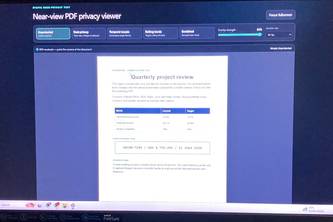
DeskShield PDF is a self-reported local-first browser extension that provides three visual privacy controls for PDF viewing: seated-user clarity, mouse-window reveal, and rolling-band overlays. It is built as a Chrome/Edge extension using React, PDF.js, and canvas rendering.
What changed
The project was submitted to the OpenAI 2026 hackathon on Devpost. No evidence of prior development or commercial activity beyond this submission exists.
Single most important open question
Does DeskShield PDF actually function as described in its self-reported write-up, and can it reliably reduce shoulder surfing, phone photography, and oversharing during screen shares?
Commercial due-diligence read
This is a self-reported hackathon project with no evidence of revenue, customers, traction, or commercial viability. The description states the product's functionality but provides no proof of performance or adoption.
What The Product Actually Is
The description states that DeskShield PDF is:
- A local-first PDF viewer
- Built as a Chrome/Edge extension (Manifest V3)
- Uses React and PDF.js for rendering
- Renders pages to a base canvas with a second canvas stacked above it for privacy effects
- Applies three visual privacy controls: seated-user clarity, mouse-window reveal, and rolling-band overlays
- Operates client-side without uploading files
- Designed as a browser extension that opens a dedicated viewer tab after explicit file picker selection
The product is described as a "local-first" PDF viewer with visual privacy controls, built using web technologies (React, PDF.js, canvas) and packaged as a browser extension.
Positioning & Claim Evolution
The description states:
- The product addresses privacy issues in normal PDF viewers that render full clarity once documents are open
- It positions privacy as a "normal viewer control" rather than requiring physical filters or locking workstations
- The author claims to have solved the problem of "shoulder surfing, phone photography, and oversharing during screen shares"
- It aims to eliminate the need for manual document splitting workflows
- The product is described as a risk-reduction tool, not a replacement for DLP, DRM, screen locks, or physical security
The positioning evolved from addressing privacy gaps in existing PDF viewers to offering a workflow solution that avoids document duplication and re-sharing.
Target Customer & ICP
The description states:
- The target use case involves screen sharing with sensitive documents
- It's designed for users who need to share PDFs during calls or presentations
- The product is positioned for "seated readers" who want to stay comfortable while others cannot easily recover content
- It's aimed at reducing exposure from "shoulder surfing, phone photography, and oversharing on screen shares"
No specific customer segments, personas, or ICP details are provided beyond general use cases around screen sharing and document privacy.
Business Model & Pricing Evidence
Not evidenced. The description does not mention any pricing model, monetization strategy, or business model.
Technical & Delivery Signals
The description states:
- Built with React, PDF.js, canvas rendering
- Uses two canvases: base page rendering + overlay for privacy effects
- Implements spatial texture generation from luminance data using weighted RGB channels
- Uses destination-out compositing for mouse-window reveal
- Rolling bands use requestAnimationFrame-driven loop gated to selected fps (20, 30, or 60)
- Bundles PDF.js and worker locally
- Requests no host permissions
- Opens dedicated viewer tab only after explicit file picker selection
- Built as Manifest V3 Chrome/Edge extension
The technical approach appears well-defined for a browser extension with canvas-based overlays.
Traction & Maturity Signals
Not evidenced. The description states this is a hackathon project submitted to the OpenAI 2026 hackathon, with no evidence of revenue, customers, or adoption beyond the submission itself.
Competitive Context
Not evidenced. No mention of existing competitive products or market positioning beyond stating that normal PDF viewers don't address privacy concerns.
Open Questions & Risks
The description states:
- The approach has inherent limits due to camera physics (sensor resolution, focal length, shutter type, HDR/multi-frame fusion)
- No purely software overlay is "camera-proof"
- The product separates validated build and automated checks from pending hardware camera matrix testing
- The author acknowledges that privacy claims must stay measured instead of overstated
- The project is described as a hackathon submission with no commercial traction
Key risks include:
- Overstated privacy claims due to inherent technical limitations
- No evidence of real-world performance or validation
- Limited commercial viability as a hackathon project
- Potential security concerns around browser extension permissions
Questions the description leaves open
- What specific camera tests have been conducted to validate the privacy claims?
- How does the product handle edge cases like very high-resolution screens or specialized camera equipment?
- What is the actual performance impact on PDF rendering and user experience?
- Has there been any independent validation of the privacy effectiveness?
- What are the limitations of the current implementation that would prevent commercial deployment?
- How does the product handle different PDF formats and complex document structures?
- What is the roadmap for addressing accessibility concerns (keyboard control)?
- Are there any known compatibility issues with different browsers or operating systems?
Overall Assessment
Not evidenced. The description states this is a hackathon project with no evidence of commercial traction, revenue, or customer adoption. The product appears to be an experimental solution to a real problem but lacks validation and commercial viability indicators.
The author's own write-up indicates that the project is experimental and not yet production-ready, with pending camera matrix testing and multiple "what's next" features that would need development before any commercial deployment could occur.
The project shows technical capability in building a browser extension with canvas overlays but provides no evidence of market traction, user adoption, or commercial viability. The self-reported nature of the description means all claims should be treated as unverified assertions about intent and design rather than proven outcomes.
User Stories BotA demo video on every pull request
Get a demo video on every new feature
GitHub App that watches your pull requests and records a narrated, captioned demo.
Save time on demo prep and make informed decisions faster with a video walkthrough of every new feature.
Source
Submitted to the OpenAI 2026 hackathon on Devpost. Project home on Devpost. Back to the full gallery on Devpost.
This competitive analysis was produced by top-founders.com (opens in a new tab)
Generated by a language model from this project's public Devpost page — its tagline, the author's own write-up and any built-with tags listed there — as captured in August 2026. Short quotations are the author's words. It is an opinion on the idea as a business, not on the people behind it, and it reflects the description as published then. If the project has moved on, request a correction below. The analysis is not independent research and contains no verified traction, revenue or customer data.
An independent guide by KFG International LLC — not affiliated with, endorsed by, or connected to Devpost or OpenAI.