

A flat backlog is a list sorted by priority. It tells you what to build next, but not how the pieces fit together, and it makes it easy to ship ten polished features that do not add up to anything a user can finish. A user story map fixes that by laying stories out along the journey a user takes, so you can see the whole product and cut a first release that works from start to end.
This guide covers how to build a story map, how to turn its top slice into an MVP scope, how to check each story with INVEST, and the splitting patterns that turn large stories into sprint-sized ones. If you need the basics first, start with how to write user stories.
What a user story map is
Story mapping was introduced by Jeff Patton, first in a 2005 article, “It's all in how you slice it”, then in his 2008 post The new user story backlog is a map, and later in his book User Story Mapping (O'Reilly, 2014). See also his story mapping resources and the Agile Alliance glossary entry.
A map has two directions:
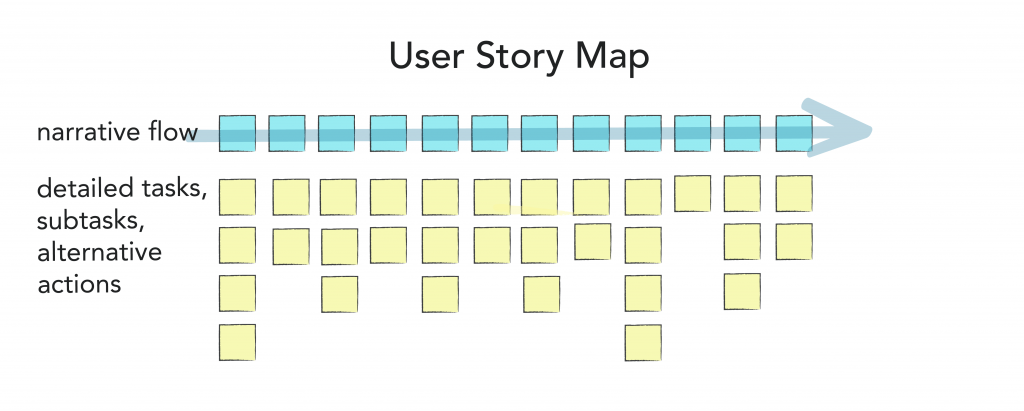
- Left to right is the narrative: the big activities a user goes through, in order, and the steps inside each. This top row is called the backbone.
- Top to bottom is priority and detail: under each step sit the stories that make it possible, with the most essential at the top and alternatives, edge cases and nice-to-haves below.
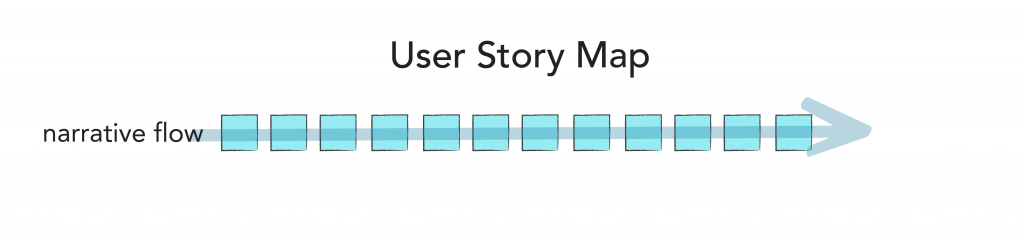
Horizontal lines across the map then divide it into release slices. Everything above the first line is the first release; it should cover every activity in the backbone, however thinly.
How to build a story map in 6 steps
You can do this on a wall with sticky notes or on a digital whiteboard. Invite the people who will decide scope and the people who will build it: product, design, at least one developer, and ideally someone who talks to customers. A first map for a small product usually takes a working session of a few hours.
1. Frame the problem
Write down who the product is for, the problem it solves, and the outcome that would tell you the first release worked. Keep it to three sentences at the top of the map. Every later cut is judged against this outcome.
2. Map the backbone
Ask “what does the user do first, and then what?” and write each activity on a card, left to right. Use verbs: “Find a walker”, not “Search”. Then break each activity into steps. Tell the story out loud as you go; gaps become obvious when someone says “wait, how did they get here?”
3. Explore the details
Under each step, add the stories that make it work: options, alternatives, error cases, admin needs. Do not filter yet. This is where the map pays for itself, because people notice missing pieces when they can see the whole journey at once.
4. Find the walking skeleton
The walking skeleton (a term from Alistair Cockburn) is the thinnest version of the product that works end to end. Pick the one story under each step that a user cannot do without, and move it to the top. If any step has nothing essential, ask whether it belongs in the backbone at all.
5. Slice releases
Draw horizontal lines to group stories into releases. Give each slice a name that states the outcome, such as “Owners can book and pay for one walk”, rather than “Release 1”. Each slice should be usable on its own and answer a question you have about the product.
6. Plan the first slice and keep the map alive
Write acceptance criteria for the stories in the first slice (our user story template has three formats), check each against INVEST, split the ones that are too big, and move them into the sprint backlog. Keep the map visible and update it after each release; it is a planning tool, not a one-off workshop output.
Example: a story map for a dog-walking app
Here is a condensed map for a marketplace that connects dog owners with local walkers. The columns are the backbone; each row is a release slice.
| Slice | Sign up | Find a walker | Book a walk | Pay | During the walk | After the walk |
|---|---|---|---|---|---|---|
| Walking skeleton (MVP) | Sign up with email; add one dog | See a list of approved walkers near a postcode | Request a time slot; walker accepts by email | Pay by card at booking | Walker marks the walk started and finished | Owner gets a summary message |
| Release 2 | Sign in with Google or Apple; several dogs | Filter by price and availability; walker profiles with photos | In-app accept and decline; reminders | Saved cards; automatic refund on cancellation | Live location on a map | Ratings and reviews |
| Later | Referral codes | Favourite walkers | Recurring weekly bookings | Subscriptions and tips | Photo updates during the walk | Rebook in one tap |
Notice what the skeleton leaves out: no live tracking, no reviews, no in-app messaging, and walker approval is done by hand. But an owner can still go from sign-up to a finished, paid walk, which is enough to test whether people will book a stranger to walk their dog.
How the map turns into an MVP scope
The top slice of a good map is your MVP scope. Use these checks before you commit to it:
- It covers every activity in the backbone. A product that lets people book but not pay is not an MVP; it is half a demo.
- It serves one primary user and one main journey. Secondary roles (admins, partners) get the minimum that keeps the journey running, often a spreadsheet or a manual step.
- It tests a specific assumption. Write the question the slice answers next to it, for example “Will owners pay before meeting the walker?”
- Manual work behind the scenes is allowed. Approving walkers by hand or sending summaries yourself is fine for the first users, and tells you what is worth automating.
- It fits your budget and timeline. If it does not, cut stories within each column (split them, using the patterns below) rather than dropping whole columns.
For founders without a technical co-founder, the map is also the most useful document you can hand a development team: it shows the whole product, the first release and the reasoning behind the cut, in one page. Our guide to building an MVP as a non-technical founder covers what to do with it next.
The INVEST checklist
Once stories are on the map, check each one in the first slice against INVEST, the acronym Bill Wake proposed in 2003 in INVEST in good stories, and SMART tasks.
| Letter | Meaning | Question to ask | If it fails |
|---|---|---|---|
| I | Independent | Can we build and release this without waiting for another story? | Combine tightly coupled stories, or split differently so each delivers on its own |
| N | Negotiable | Is the solution still open for discussion? | Remove implementation detail from the story; keep it in notes |
| V | Valuable | Would a user or the business notice if this shipped? | Merge technical tasks into the story they serve |
| E | Estimable | Does the team know enough to size it? | Run a time-boxed spike, or ask the questions blocking the estimate |
| S | Small | Does it fit comfortably in one sprint? | Split it with one of the patterns below |
| T | Testable | Can we write acceptance criteria that pass or fail? | Replace vague words (“fast”, “easy”) with observable outcomes |
Independence is the hardest criterion to meet fully, and it is fine to treat it as a goal rather than a rule. Small and Testable are the ones worth being strict about.
How to split user stories
Split stories vertically: every piece should still deliver something a user can see, through every layer of the system. Splitting by layer (“build the database”, “build the API”, “build the screen”) produces pieces that deliver nothing until all three are done, which defeats the point. These patterns, collected in the Humanizing Work guide to splitting user stories by Richard Lawrence and Peter Green, cover most cases.
Workflow steps
Split a multi-step process into its steps, or build the simple end-to-end version first and add steps later. “Book a walk” becomes: request a slot; walker accepts; owner gets a confirmation. Later: walker proposes a different time.
Business rule variations
If a story has several rules, ship the most common one first. “Cancellation refunds” becomes: full refund if cancelled 24 hours ahead; partial refund inside 24 hours; no refund after the walk starts.
Data variations
Start with one kind of data and add the others. “Search by location” becomes: search by postcode; then by current location; then by drawing an area on a map.
Happy path first, unhappy paths next
Build the main success path, then handle failures as separate stories, ordered by how often they happen and how much damage they cause. “Pay by card” becomes: successful payment; card declined; payment provider unavailable.
Operations
“Manage dogs” hides create, view, edit and delete. Often only create and view are needed for the first release.
Interface or platform variations
Ship on one platform or one input method first. Web before mobile, or English before other languages, if your first users allow it.
Simple version first, defer performance
Make it work, then make it fast. A walker list that loads in three seconds for 50 walkers is fine for a pilot city; optimise when the numbers justify it, as its own story.
Spike
When a story cannot be estimated because of an unknown (“can we get live location in the background on both phone platforms?”), split off a short, time-boxed investigation. The spike's output is knowledge and a better-sized story, not shipped functionality.
SPIDR: a short version to remember
Mike Cohn groups the main splitting techniques under the acronym SPIDR: Spikes, Paths, Interfaces, Data and Rules (Five simple but powerful ways to split user stories). If a story is too big and you are not sure where to start, walk through the five in that order.
| Technique | Split by | Example |
|---|---|---|
| Spikes | Research the unknown first | Two-day spike on background location before estimating live tracking |
| Paths | Alternative paths through the story | Pay by card now; pay by wallet later |
| Interfaces | Device, browser or interface type | Owner booking on web first, mobile app second |
| Data | Types or ranges of data | One dog per booking first; several dogs later |
| Rules | Business rules, relaxed at first | No cancellation rules in the pilot; refund policy as its own story |
Common story mapping mistakes
- Mapping features instead of user activities. A backbone of “Login, Dashboard, Settings” describes screens, not a journey.
- Building the first slice one column deep. Polishing sign-up before booking exists leaves you with nothing to test.
- Letting the map get too detailed. If you are writing acceptance criteria on the wall, you have moved from mapping to refinement.
- Mapping without developers in the room. Slices drawn without them often hide expensive stories at the top.
- Treating the map as finished. After each release, move what you learned onto the map and re-cut the next slice.
For well-formed stories you can adapt for your own map, see our user story examples.
Tools for story mapping
A wall and sticky notes still work best for the first session with everyone in one room. For remote teams, general whiteboards such as Miro and FigJam have story map templates, and dedicated tools such as StoriesOnBoard sync maps with backlog trackers. Jira and similar trackers can show stories grouped by epic, which gives you the backbone, but you usually need a plugin or a whiteboard to see release slices. Pick the tool your team will keep open; a map nobody updates stops being useful within a sprint or two.
Frequently asked questions
What is user story mapping?
A technique, introduced by Jeff Patton, for arranging user stories along the journey a user takes (the backbone, left to right) and by priority (top to bottom). Horizontal lines divide the map into release slices, so the team can plan releases that work end to end.
What is the difference between a story map and a product backlog?
A backlog is a single list ordered by priority. A story map shows the same stories in two dimensions, by user activity and by priority, so you can see how they fit together and whether a release covers the whole journey.
What is a walking skeleton?
The thinnest version of a product that works from start to end, with one essential story under each step of the journey. The term comes from Alistair Cockburn; on a story map it is usually the first release slice.
What does INVEST stand for?
Independent, Negotiable, Valuable, Estimable, Small and Testable. Bill Wake proposed it in 2003 as a checklist for good user stories.
How small should a user story be?
Small enough for the team to finish, test and demo within one sprint, and ideally within a few days. If a story regularly takes a whole sprint, split it.
What is SPIDR?
A set of five story-splitting techniques described by Mike Cohn: Spikes, Paths, Interfaces, Data and Rules.
Who should take part in a story mapping session?
The people who decide scope and the people who will build it: product owner or founder, designer, at least one developer, and ideally someone who talks to customers, such as support or sales.
Have a map, or just an idea, and need the first slice built? We can help you cut an MVP scope that works end to end and ship it in short sprints. See our monthly development plans.